IP Webcam
Price: Free
Rating: 
Android App Review by AndroidAppsReview.com
We’ve seen a whole lot of security hardware and applications lately, which leads us to think just about everyone is worried about keeping an eye on things. Now, that’s an understandable concern. Times are harder, and the between porch pirates and wandering pets we know it can touch to know what’s going on in your castle.
In our case we’re quite into 3D printing with our amazing Ender 3 S1 and from sheer laziness would like to see how a print is coming along without trudging upstairs to see for ourselves.
Whatever your reason for needing to extend your view, you might try IP Webcam.
IP Webcam is a terrific app that turns your old phone that’s just collecting dust into a bona fide robust IP Camera. Simple and free, nothing wrong with that.
Be it home monitoring, pet monitoring, 3D print monitoring or anything else monitoring, it lets you to use just about any old phone, and to interact with it in such simple ways we couldn’t have imagined possible.
If that’s got your interest, then creep on down below the break to see the whole rundown!
Concept and Functionality
As stated, IP Webcam, from Pavel Khlebovich, aims to provide you with a convenient and simple way to put that old phone to work. I mean c’mon, since it already has a camera and IP capability, as well as a light if needed, why not?
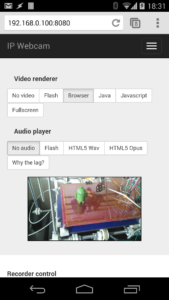
The setup is tres simple and an effective way of monitoring your home situation or anything so long as you can supply power or can recharge the phone as needed. How does the app do this? It simply provides you with an ip address (typically 192.168.12.236) on your LAN for local viewing on port 8080 or you can opt to broadcast the video for remote viewing. Additionally, you can require a login/password or leave it open, your call.
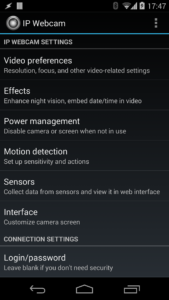
To get rolling, you’ll need to install IP Webcam on the phone you’ll be using and for starters place it within your home that contains the router you have access to. On the app tap the 3 dots in the upper right corner and select “Start server”. Once that’s done, using your favorite browser, just open a webpage and go to the assigned IP address. This can be on a Mac, a PC, or a smartphone of just about any variety. That’s it, you’re off and rolling!
From here, you can now use the app on your phone to see the situation you’re monitoring instantly. Not only that, you can record on a schedule, receive an email update when motion is detected, or even two-way talk with the device at home. How’s that for security?
If you see an invader, you can take advantage of the 2-way audio and simply yell at them from wherever you are.
Joking aside, the functionality here is exactly what we’d expect and then some. Of course, even more potentiality is available should you be using a dedicated IP.
Design and Interface
Typically when we look at monitoring/security apps like this, they’re a bit rough around the edges. Or, they’re rather . . . industrial in design. However, IP Webcam is neither of these things.
The app is pleasant to look at, providing a warm, inviting area for you to use the supplied features. That might seem like a small part of the experience, but considering you’re ensuring the integrity of whatever it is you’re viewing, as well as potentially property and loved-ones, a little cheer is appreciated.
Not only that, but we had no problems getting to the features we wanted, or using the app in general.
Connectivity was immediate and problem-free, as was the interaction thereafter. All said, it’s a solid outing, and one that’s clearly been given a lot of development attention.
Overall Value
As a free app to download in the Google Play Store, there’s just not a lot of reason to skip IP Webcam. If you’re at all concerned about an inexpensive way to begin monitoring something of importance, this is the ideal setup for you. Reuse old hardware, no complicated setup, and no expensive fees. That sounds like a fantastic bargain to us.
IP Webcam earns our solid recommendation, and currently tops the security app stack, as far as we’re concerned.
IP Webcam requires Android version 4.1+ and if the CPU is 1.2 GHz or higher, it should be fine.
AndroidAppsReview’s Rating:
Find your next Android app at AndroidAppsReview.com
What do YOU think? We’d love to hear your comments, try it and let us know!